
Disclosure: This post contains affiliate links. As an Amazon Associate, ToolUnbox earns from qualifying purchases, at no extra cost to you. How we earn money.
The best portable monitor for laptop work is the VisionOwl 16-inch 2.5K. It connects with one USB-C cable, packs a sharp 2560 x 1600 screen at 144Hz, and weighs about a pound and a half. It’s the one I’d put in my own laptop bag, and I don’t say that lightly.
If it’s out of stock, the cocopar 16-inch 2.5K is a near twin with the same resolution, brightness and weight. On paper you give up almost nothing.
I compared six screens on single-cable setup, clarity, weight, motion and what comes in the box. Each review below also says who should pass.
Best Portable Monitor for Laptop Picks at a Glance
| # | Product | Best For | Screen | Weight | Link |
|---|---|---|---|---|---|
| 1 | VisionOwl 16″ 2.5K 144Hz | One-cable laptop setup | 2560 x 1600, 144Hz, 470 nits | 1.48 lb | Check Price |
| 2 | cocopar 16″ 2.5K 144Hz | Backup pick with the same sharp panel | 2560 x 1600, 144Hz, 470 nits | 1.5 lb | Check Price |
| 3 | cocopar 15.6″ 1080p (Black) | Simple 1080p setup | 1920 x 1080, 60Hz, 280 nits | 1.5 lb bare, 2.4 lb with cover | Check Price |
| 4 | cocopar 15.6″ 1080p (Silver) | Budget pick | 1920 x 1080, 60Hz, 300 nits | 2.4 lb listed | Check Price |
| 5 | VisionOwl 18.5″ 1080p 100Hz | A big canvas at a desk | 1920 x 1080, 100Hz, 320 nits | 2.7 lb | Check Price |
| 6 | VisionOwl 15.6″ 1080p (Silver) | Aluminum body at 1080p | 1920 x 1080, 60Hz, 300 nits | 2.3 lb with cover | Check Price |
What Makes a Good Laptop Monitor? A Short Buying Guide
I ranked these on five things, weighted roughly in this order. This is research, not a lab bench: I compared spec sheets, Amazon listings and the makers’ setup FAQs, then read owner feedback for real-world setup stories. Our full method is on the how we review page.
Laptop Connectivity
This carries the most weight, about a third of my decision. You want a full-function USB-C port that carries video and power over a single cable.
Here’s the catch most buyers miss. Your laptop’s USB-C port must support DisplayPort Alt Mode or Thunderbolt. Every maker’s FAQ in this group says the same thing, and a charge-only port will show no signal at all.
Screen Clarity
Resolution, brightness and color range decide how crisp text looks. The two 16-inch models run 2560 x 1600 at 470 nits with 110% sRGB. The 15.6-inch screens drop to 1920 x 1080 and 280 to 300 nits.
Portability
Weight and width matter more than thickness. A screen at 1.5 lb barely registers in a backpack. At 2.7 lb you’ll feel it on a long commute.
Smooth Motion
Most office monitors run at 60Hz, which is fine for documents. The 144Hz models make scrolling and casual games look noticeably smoother, and the 18.5-inch VisionOwl sits in between at 100Hz.
Build Value
Look at what’s in the box: sleeve or cover, power adapter, cables and VESA holes. Metal bodies and kickstands beat flimsy fold-over covers for daily use.
Product links go to Amazon, and toolunbox may earn an affiliate commission. It doesn’t change the ranking.
The 6 Best Portable Monitors for Laptops
1. VisionOwl 16-Inch 2.5K 144Hz: Best for Laptop Connectivity

VisionOwl 16 Inch 2.5K 144Hz Portable Monitor
Best for: Laptop users who want one cable and a sharp screen
Check Price on AmazonThis is the most complete package in the group. You get a 16-inch 2560 x 1600 IPS panel at 144Hz in a 16:10 shape, which gives you a little more vertical room for documents than a standard 16:9 screen.
The listing quotes 470 nits, 110% sRGB and an 8-bit + 2FRC panel that shows up to 1.07 billion colors. FreeSync and HDR are listed too. For spreadsheets and photo work on the road, that’s a big step up from the 1080p screens here.
Connectivity is where it wins. There are two USB-C ports plus a full-size HDMI port, not the fragile mini version. Owners repeatedly describe plugging in a single USB-C cable to a work or personal laptop and having it work with no drivers.
The metal body weighs 1.48 lb. A kickstand folds out of the back, there are VESA holes for a mount, and the box includes a sleeve case, power adapter, HDMI cable and two USB-C display cables.
One owner teaches classes online while traveling abroad with it. Another works on a patio with just the single USB-C link, no power brick.
Pros
- Single USB-C cable for power and video on compatible laptops
- Sharp 2560 x 1600 panel at 144Hz
- Light 1.48 lb metal body with kickstand
- Full-size HDMI plus two USB-C ports
- Complete kit: sleeve, adapter and three cables
Cons
- The maker’s FAQ says to use the power adapter if the screen flickers
- 13.9 inches wide, so a tight laptop sleeve may not fit both
Skip it if your laptop has no USB-C video port and you don’t want to run HDMI plus power.
2. Cocopar 16-Inch 2.5K 144Hz: Best 2.5K Alternative

cocopar 16 Inch 2.5K 144Hz Portable Monitor
Best for: A near twin of our top pick when it is sold out
Check Price on AmazonThe cocopar matches our winner on the specs that matter most. It’s a 16-inch 2560 x 1600 panel in 16:10, rated at 470 nits and 110% sRGB, with a 1200:1 contrast ratio.
There’s one quirk in the refresh rate. The title lists 144Hz over USB-C but 120Hz over HDMI, so console or HDMI users get slightly less.
It weighs 1.5 lb and measures 0.2 inches at its slimmest point. The full metal chassis has a metal kickstand, VESA mounting and built-in speakers, and cocopar lists a blue light filter and a flicker-free screen.
Two full-function USB-C ports and one HDMI port cover MacBook, Mac mini, Surface Pro, Surface Laptop, HP, Dell and ASUS machines, per the listing. When I read through owner feedback on cocopar’s listing, the same two points kept coming up: quick Windows setup and a true plug-and-play USB-C link.
Pros
- Same 2560 x 1600, 470-nit panel as the top pick
- 1.5 lb and 0.2 inches at the slimmest point
- Metal chassis and kickstand
- Blue light filter and flicker-free listed
Cons
- HDMI tops out at 120Hz
- 14.4 inches wide, the widest of the 16-inch pair
- Owner feedback looks shared across cocopar sizes, so it’s less model-specific
Skip it if you mainly connect a console over HDMI and want the full 144Hz.
3. Cocopar 15.6-Inch 1080p (Black): Simplest 1080p Setup
cocopar 15.6 Inch 1080P Portable Monitor
Best for: Office work where 1080p is plenty and setup must be easy
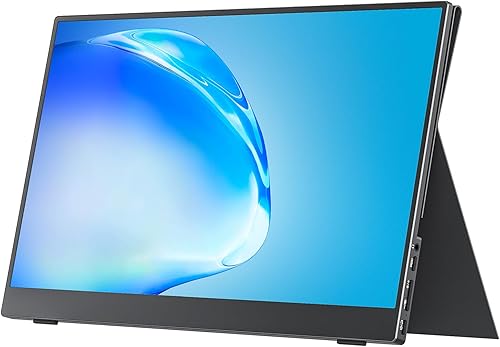
Check Price on AmazonIf you mostly need a second window for email and chat, 1080p is enough. This cocopar keeps things simple: one USB-C cable carries both power and video, and owners report quick setup with no drivers.
The screen is a 15.6-inch 1920 x 1080 IPS panel at 60Hz. It’s rated at 280 nits with 85% sRGB, a 178-degree viewing angle and HDR, so it’s dimmer and less colorful than the 2.5K models.
Weight is the twist. The monitor alone is 1.5 lb and just 4mm (0.2 inches) at its slimmest, but the magnetic cover brings it to 2.4 lb. It’s VESA mountable and works with PS4 and Xbox as well as laptops.
Pros
- One USB-C cable for power and video
- 1.5 lb without the cover
- Two USB-C ports plus HDMI
- VESA mountable
Cons
- 280 nits is the dimmest screen here
- 60Hz refresh
- 2.4 lb once the magnetic cover goes on
Skip it if you work in bright rooms or near windows.
4. Cocopar 15.6-Inch 1080p (Silver): Best Budget Laptop Extender

cocopar 15.6 Inch 1080P Portable Monitor Silver
Best for: First-time buyers who want a basic second screen
Check Price on AmazonThis is the budget pick. It’s a 15.6-inch 1080p IPS panel at 60Hz, rated at 300 nits and 1000:1 contrast, a touch brighter than its black sibling.
The listing says two full-feature USB-C ports let one cable carry power and display on compatible laptops. You also get HDMI, a 3.5mm audio jack, dual speakers, FreeSync, HDR and a low blue light mode.
It’s built for desks as much as bags. There are two VESA holes for landscape or portrait mounting, and a magnetic leather cover protects the whole screen.
The listed weight is 2.4 lb, so it’s no featherweight. I had no owner feedback for this exact model, so everything here comes from the listing.
Pros
- Budget-friendly entry point
- 300 nits, brighter than the black cocopar
- VESA holes for portrait mode
- Works with PS4/PS5, Xbox and Raspberry Pi
Cons
- 2.4 lb listed weight
- 60Hz refresh
- No owner feedback to confirm the claims
Skip it if you commute daily and count every ounce.
5. VisionOwl 18.5-Inch 1080p 100Hz: Best Big-Screen Portable
VisionOwl 18.5 Inch Portable Monitor
Best for: Long desk sessions where screen size beats weight
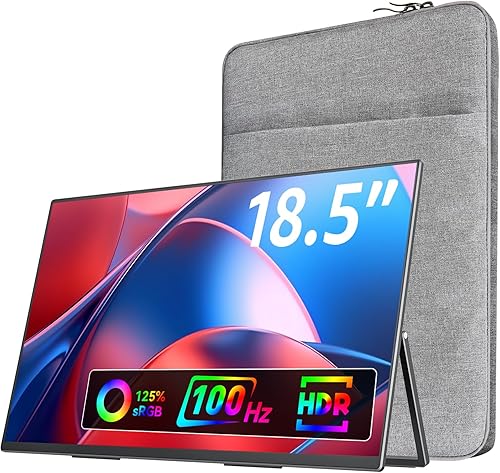
Check Price on AmazonThe 18.5-inch VisionOwl is for people who want a real second monitor, not a travel accessory. It’s 1080p at 100Hz, smoother than the 60Hz screens, and rated at 320 nits with 1200:1 contrast.
Color specs are a little muddled. The bullets quote 125% sRGB (88% NTSC), while the spec table says 120% sRGB, and one owner questioned the color accuracy of their first unit. They say the maker sent a replacement that looked much better.
Setup feedback is strong. Owners describe it as plug and play, with one cable to a Mac, and they like the simple metal kickstand, padded sleeve and three included cords. There are 75 x 75mm VESA holes too.
The cost is bulk. It weighs 2.7 lb and measures 16.6 inches wide, which won’t fit most laptop bags.
Pros
- Biggest screen in the group at 18.5 inches
- 100Hz refresh for smoother scrolling
- Metal back panel and integrated stand
- Owners report easy single-cable setup
Cons
- 2.7 lb and 16.6 inches wide
- Conflicting color gamut figures
Skip it if the monitor has to live in a standard laptop bag.
6. VisionOwl 15.6-Inch 1080p (Silver): Best Metal-Body 1080p Pick

VisionOwl 15.6 Inch 1080P Portable Monitor
Best for: Buyers who want an aluminum shell on a 1080p screen
Check Price on AmazonThis VisionOwl wraps a standard 1080p panel in an aluminum alloy body, which the listing says helps with heat. Among the 1080p screens, it has the sturdiest material on paper.
The panel itself is ordinary: 1920 x 1080 IPS, 300 nits, 85% sRGB, 60Hz, HDR and a 178-degree viewing angle. Single-cable USB-C power and video works with Thunderbolt 3, 4 and 5 laptops, per the listing, and there are dual USB-C ports and a standard HDMI port.
With its cover it weighs 2.3 lb. A power adapter is included, and the screen is VESA mountable. I found no owner feedback for this model, so treat the build claims as the maker’s word.
Pros
- Aluminum alloy body
- Dual USB-C plus standard HDMI
- Power adapter and cover included
Cons
- Ordinary 1080p, 60Hz panel
- 2.3 lb with cover
- No owner feedback
Skip it if sharp text matters to you, because the 2.5K models are in a different league.
Will It Fit Your Bag? Size and Setup Reference
Width decides whether a monitor slides in next to your laptop. Here’s every listed width and weight in one place.
| Monitor | Listed Width | Weight | Refresh Rate |
|---|---|---|---|
| VisionOwl 16″ 2.5K | 13.9 in | 1.48 lb | 144Hz |
| cocopar 16″ 2.5K | 14.4 in | 1.5 lb | 144Hz (120Hz on HDMI) |
| cocopar 15.6″ Black | 14.12 in | 1.5 lb bare, 2.4 lb with cover | 60Hz |
| cocopar 15.6″ Silver | 14 in | 2.4 lb | 60Hz |
| VisionOwl 18.5″ | 16.6 in | 2.7 lb | 100Hz |
| VisionOwl 15.6″ Silver | 14 in | 2.3 lb with cover | 60Hz |
If your laptop sleeve is already snug, anything but the 18.5-inch model should fit beside a 14 to 16 inch laptop.
Before you buy, run through this checklist. I pulled every step from the makers’ own troubleshooting FAQs:
- Check that your laptop’s USB-C port supports DisplayPort Alt Mode or Thunderbolt. The USB Implementers Forum site explains USB-C standards if your laptop’s spec sheet is vague.
- Use the included USB-C display cable. Charge-only cables carry no video.
- On a locked-down work laptop, restart first, then ask IT if a security policy blocks external displays.
- If the screen flickers or looks dim, plug in the included power adapter. Some laptops can’t supply enough power over USB-C alone.
- For an older laptop with only a mini DisplayPort, buy a mini DP to HDMI adapter.
- To mount it, match the VESA hole pattern to your arm. VESA maintains that mounting standard.
Which Portable Monitor Should You Buy?
- If you work from a MacBook or Windows laptop in cafés and want one cable, get the VisionOwl 16″ 2.5K. Working in public? Our privacy screen protector guide covers the phone in your other hand.
- If you read documents and spreadsheets for hours, get either 16-inch 2.5K model. The extra pixels make small text far crisper than 1080p.
- If you commute daily with the monitor in a backpack, stick to the 1.5 lb screens: the VisionOwl 16″, the cocopar 16″ or the black cocopar without its cover.
- If you want videos or casual games on a second screen while traveling, pick a 144Hz 16-inch model, or the 100Hz VisionOwl 18.5″ if bag space isn’t a problem.
- If this is your first portable monitor and you want the most in the box, the VisionOwl 16″ includes a sleeve, adapter and three cables. On a tight budget, the silver cocopar covers the basics.
More laptop gear lives in our computer accessories hub, part of the wider tech and gadgets section.
Frequently Asked Questions
Do Portable Monitors Work With Any Laptop?
Most do, but single-cable use needs a USB-C port with DisplayPort Alt Mode or Thunderbolt. Every monitor here also has HDMI, so older laptops can connect with an HDMI cable plus separate power. Laptops with only a mini DisplayPort need an adapter.
Does a Portable Monitor Need a Power Adapter?
Often it doesn’t. A capable USB-C port can power the screen and send video over one cable. The makers recommend the included power adapter if the screen flickers or looks dim, and owners report the brightest picture with the adapter connected.
Is 2.5K Worth It on a 16-Inch Portable Monitor?
I think so, if you read or edit text for long stretches. At 2560 x 1600, the 16-inch models show noticeably finer text than the 1920 x 1080 screens. For video calls and email alone, 1080p is fine.
Is 144Hz Useful for Office Work?
It’s not essential, but it makes scrolling look smoother and helps casual gaming. For spreadsheets and documents, 60Hz works. The cocopar 16-inch drops to 120Hz over HDMI.
Can I Connect a Phone or Nintendo Switch 2?
The makers say iPhone 15 and 16 models (except the 16e) connect directly with the included USB-C cable. Older iPhones need Apple’s Lightning Digital AV Adapter. For a Switch 2, cocopar says to use the dock’s HDMI output.
What Size Portable Monitor Is Best for Travel?
A 15.6 or 16 inch screen around 1.5 lb is the sweet spot. Those measure about 14 inches wide and slip in beside most laptops. The 18.5-inch VisionOwl, at 16.6 inches wide, is better suited to a desk.
Last updated: November 2026