

Disclosure: This post contains affiliate links. As an Amazon Associate, ToolUnbox earns from qualifying purchases, at no extra cost to you. How we earn money.
The best front and rear dash cam for most drivers is the Vantrue N4 Pro S. It records 4K up front and 2.5K out the back, both on Sony STARVIS 2 sensors, and adds a 1080P cabin camera. The rear camera also rotates 360 degrees, so you can aim it at traffic or into the trunk area.
It’s also one of the more involved installs here. If you want strong night footage and an easier install, the 70mai A810S is the simpler pick with a 4K front and 1080P rear.
I compared six dash cams from Vantrue, 70mai, IIWEY and Icesky. Two record front and rear, one adds a cabin view, and three cover four or more angles.
Best Front and Rear Dash Cam Picks at a Glance
| # | Product | Best For | Front / Rear Video | Cameras | Link |
|---|---|---|---|---|---|
| 1 | Vantrue N4 Pro S | Sharpest rear footage plus cabin | 4K / 2.5K | 3 | Check Price |
| 2 | 70mai A810S | Night driving and easy setup | 4K / 1080P | 2 | Check Price |
| 3 | IIWEY N6 | Front, rear and both sides | 1440P on all four | 4 | Check Price |
| 4 | 70mai A800SE | A rear lens you can turn inward | 4K / 1080P | 2 | Check Price |
| 5 | IIWEY N5 | Four plug-in channels, no GPS | 1080P (see review) | 4 | Check Price |
| 6 | Icesky S03 | The most camera angles | 4K / 1080P | 5 views | Check Price |
How I Compared These Dash Cams
I didn’t mount these in my car. When I compared them, I used the Amazon listings, the manufacturer spec sheets, and owner feedback where it existed. You can read about how we review products on our about page.
Rear coverage carried the most weight (35 percent), because that’s the reason to buy a two-camera system. After that came front video quality, night vision, parking mode and ease of setup.
Three of the six listings had no owner feedback to read: the IIWEY N6, the 70mai A800SE and the Icesky S03. Their reviews lean on the listing alone, and I say so. As an Amazon Associate, ToolUnbox earns from qualifying purchases, which doesn’t change the ranking.
The 6 Best Front and Rear Dash Cams
1. Vantrue N4 Pro S 3-Channel Dash Cam: Best Overall

Vantrue N4 Pro S 4K 3-Channel Dash Cam
Best for: Clear rear footage plus a cabin camera for rideshare drivers
Check Price on AmazonThis is the one I’d pick for the clearest view behind the car. It records 4K front, 2.5K rear and 1080P cabin video at 30 frames per second, all on STARVIS 2 sensors. You can also switch to a front-and-rear mode if you don’t want the cabin camera running.
The rear camera rotates a full 360 degrees. Point it out the back glass for traffic, or turn it to watch cargo. Vantrue adds HDR, its PlatePix plate-capture tech, 5GHz Wi-Fi, GPS, voice control and a supercapacitor instead of a battery, plus loop recording in 1, 2 or 3-minute clips on cards up to 1TB.
Owners praise the sharp 4K front and say plates are readable in many conditions. The setup themes are mixed: the printed instructions get good marks, but several owners call the phone app setup a little involved. One owner reports the night infrared mode failing after two months.
Pros
- 2.5K rear camera, the sharpest rear video here
- Rear lens rotates 360 degrees
- Buffered parking mode with motion and impact detection
- GPS, 5GHz Wi-Fi and voice control
Cons
- Bulkier to tuck behind the mirror, going by its listed size
- Plan on hardwiring it for parking mode
- App setup takes some patience, per owners
Skip this one if you want a small, plug-and-go camera.
2. 70mai A810S 4K Front and Rear Dash Cam: Best for Night Driving

70mai A810S 4K Front and Rear Dash Cam
Best for: Night commuters who want a simple dual-camera install
Check Price on AmazonThe 70mai uses two STARVIS 2 sensors: an IMX678 for the 4K front and an IMX662 for the 1080P rear. A large F1.7 aperture and 70mai’s night processing aim at low-light clarity. Owners single out the dynamic range, especially when driving in and out of garages and under overpasses.
It’s packed for the size. You get GPS with five satellite systems, Wi-Fi 6, voice control, ADAS lane and collision alerts, and AI motion detection for parking. Remote viewing and live alerts need the optional 4G hardwire kit (UP05).
Owners call the front camera easy to mount with the lighter plug. Wiring the rear camera takes more effort, though owners don’t call it hard. A few also suggest buying a large microSD card, since 4K files fill cards fast.
Pros
- Two STARVIS 2 sensors for strong night footage
- 150-degree field of view
- GPS, Wi-Fi 6, ADAS and voice control
- Supports cards up to 512GB
Cons
- Rear is 1080P, not 2.5K
- 4G remote features cost extra (optional kit)
- Rear wiring takes extra time
Skip this one if you want a cabin camera too.
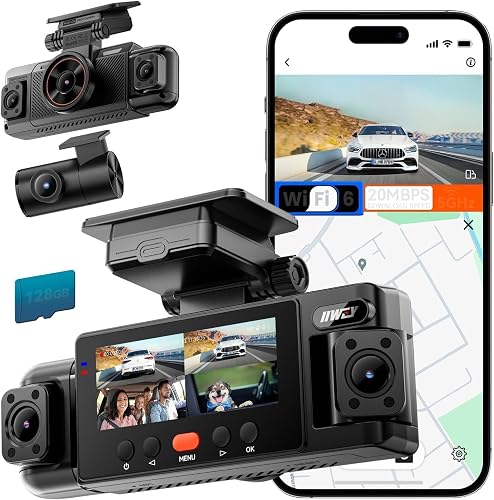
3. IIWEY N6 4-Channel 360 Dash Cam: Best All-Around Coverage
IIWEY N6 4-Channel 360 Dash Cam
Best for: Recording front, rear and both sides at the same time
Check Price on AmazonThe N6 records four channels at 1440P: front, rear and both sides. The front and rear lenses cover 170 degrees, and the side lenses cover 150. Eight IR lights help with low-light recording, according to the listing.
Parking mode has two settings. Time-lapse records at 1, 3 or 5 frames per second for up to about 48 hours, and impact detection saves events, but both need a hardwire kit.
You also get Wi-Fi 6 with a 5.8GHz band, built-in GPS and a 128GB card in the box.
Note that it has no built-in battery and must stay connected to car power. I found no owner feedback on this listing, so night footage and setup are unverified.
Pros
- Four channels, including both sides
- 170-degree front and rear field of view
- 48-hour time-lapse parking (hardwired)
- 128GB card included
Cons
- 1440P front, lower than the 4K picks
- No owner feedback available
- Cards top out at 256GB
Skip this one if you want 4K plate detail up front.
4. 70mai A800SE 4K Dash Cam: Best Flexible Rear Camera

70mai A800SE 4K Front and Rear Dash Cam
Best for: A rear lens that turns from the road to the cabin
Check Price on AmazonThis 70mai pairs a 4K front with a 1080P rear camera whose lens adjusts. Aim it behind the car, or tilt it into the cabin if you drive passengers. A 3-inch IPS screen sits on the main unit.
For night driving, the listing cites an F1.55 aperture, a 7-layer glass lens and dual HDR. It includes a 128GB card, supports up to 512GB, and adds Wi-Fi 6, GPS, ADAS alerts and over-the-air updates. 70mai backs it with an 18-month warranty.
The trade-offs are a narrower 140-degree view and parking monitoring that’s listed as optional. This listing had no owner feedback for me to read.
Pros
- Adjustable rear lens for road or cabin
- Bright F1.55 aperture with dual HDR
- 128GB card included
- 18-month warranty
Cons
- 140-degree view is the narrowest here
- Parking monitoring is optional
- No owner feedback available
Skip this one if you need both a rear view and a cabin view at once.
5. IIWEY N5 4-Channel Dash Cam: Best Basic Four-Channel Pick
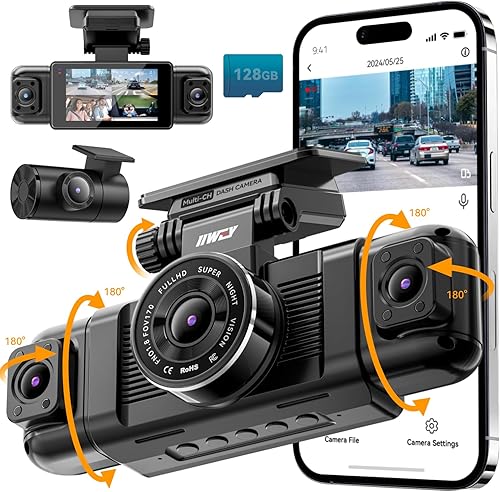
The N5 records four channels, including front, rear and inside, on a 3-inch IPS screen. The listing is inconsistent on resolution. The title says 2K front, while a bullet lists 1080P on all four channels.
There are quirks to know before buying. It has no GPS, and it must run on the included lighter charger, not a USB cable. You long-press a button to turn on Wi-Fi every time you connect the app, and parking mode needs a hardwire kit sold separately.
Owners like the coverage and say the front footage is sharp enough to read plates. Several report a quick plug-in install. The common gripe is the Wi-Fi fighting with Android Auto in the car.
Pros
- Four camera angles
- 170-degree field of view
- 128GB card pre-installed
- Owners report quick installs and clear footage
Cons
- No GPS
- Resolution claims conflict in the listing
- Wi-Fi must be turned on manually each time
Skip this one if you want speed and location stamps on your footage.
6. Icesky S03 4K Multi-Camera Dash Cam: Most Camera Angles

Icesky S03 4K Dash Cam Front, Rear, Left and Right
Best for: Drivers who want the most angles in one kit
Check Price on AmazonThe Icesky lists a 4K front camera plus 1080P rear, inside, left and right cameras. That’s five views, even though the listing calls it a 4-channel system. Confirm what’s in the box before you start routing cables.
It has a 3-inch display, built-in GPS, 5.8GHz Wi-Fi 6 and a 128GB card, with support up to 512GB. Eight IR lights serve the left and right cameras only. The listing mentions no rear infrared and gives no hardwire details for its 24-hour parking mode.
With five cameras, setup means a lot of cabling. I found no owner feedback on this listing, so it’s promising on paper and unproven otherwise.
Pros
- 4K front plus four 1080P views
- Built-in GPS and Wi-Fi 6
- 128GB card included
- Supports cards up to 512GB
Cons
- Camera count in the listing is unclear
- No owner feedback available
- Most cabling of any pick
Skip this one if you want a quick, tidy install.
What to Look for in a Front and Rear Dash Cam
Rear Coverage
Check the rear camera’s resolution and sensor, not just the front. The Vantrue’s 2.5K rear beats the 1080P rears on every other pick. Also check how the rear camera connects, since a long wired run is the hardest part of most installs.
Video Quality
A 4K front camera makes plates easier to read at a distance. Sensor quality matters as much as pixel count, which is why both 70mai models and the Vantrue name their Sony STARVIS 2 sensors.
Night Vision
Look for a STARVIS 2 sensor, a wide aperture (lower F-number is brighter) and HDR. IR lights help inside the cabin or on side cameras at night. They don’t light up the road ahead.
Parking Mode
Most real parking protection needs a hardwire kit, which connects the camera to your fuse box. Buffered recording, like the Vantrue’s, saves the seconds before an impact, not just after.
Ease of Setup
A front-only plug-in setup takes minutes. Rear and side cameras add cable runs along the headliner and pillars. Apps vary too, and owners mention clunky Wi-Fi more than any other setup problem.
Which Front and Rear Dash Cam Should You Buy?
- If you drive rideshare and want to record passengers and the road behind at all times, get the Vantrue N4 Pro S.
- If you want to read plates clearly in daylight and sharp detail, get the Vantrue N4 Pro S or the 70mai A810S, both with 4K STARVIS 2 fronts.
- If you mostly drive at night on poorly lit roads, get the 70mai A810S.
- If you want protection against hit-and-run damage while parked, get the Vantrue N4 Pro S for its buffered parking mode, or the IIWEY N6 for 48-hour time-lapse coverage.
- If you’re a first-time buyer who wants an install done in under thirty minutes, get the 70mai A810S and start with the front camera on the lighter plug.
More car gear lives in our car and garage hub. If you do your own maintenance, our best socket set guide covers the tools for the job.
How to Install a Front and Rear Dash Cam
A clean install keeps cables out of sight and out of your airbags’ way. Here’s the order I’d follow:
- Test everything first. Plug the front and rear cameras in on the seat, format the card in the camera, and check that both views record.
- Mount the front camera behind the mirror. Clean the glass, and give the adhesive time to set before you load it. One Vantrue owner waited 12 hours.
- Run the front power cable up into the headliner. Tuck it along the passenger-side pillar trim and down to the lighter socket or fuse box.
- Keep cables behind airbag covers, not across them. Route along the pillar edge so the curtain airbag can still deploy.
- Route the rear cable along the headliner to the back glass. Mount the rear camera high and centered, inside the wiper’s sweep if you have a rear wiper.
- Add a hardwire kit for parking mode. Use an add-a-fuse on a circuit that turns off with the ignition, plus one constant circuit if the kit asks for it. If you’re unsure, pay a shop.
- Peel the lens film and check the angle. IIWEY warns that leftover protective film can put red lines in footage.
A few card tips help too. Use a high-endurance microSD card rated for constant writing, and stay within each camera’s maximum (256GB on the IIWEY models, 512GB on the 70mai and Icesky picks). Format it every month or so, and save important clips to your phone right away.
One legal note: rules on windshield mounting and recording audio differ by state. Your state’s motor vehicle agency, linked from USA.gov, is the place to check before you mount anything.
Frequently Asked Questions
Do Front and Rear Dash Cams Need to Be Hardwired?
Not to record while driving. Most plug into the lighter socket, and the rear camera connects by cable. You need a hardwire kit for most parking modes, including on the Vantrue, IIWEY N5 and IIWEY N6.
Is 4K Worth It on a Dash Cam?
Yes, for the front camera. 4K gives you more pixels to read plates at a distance, especially when you zoom into a clip. The rear camera matters too, which is why the Vantrue’s 2.5K rear stands out.
What Is a 3-Channel Dash Cam?
A 3-channel dash cam records three views at once, usually front, rear and cabin. The Vantrue N4 Pro S is a 3-channel model. Rideshare drivers like them because the cabin camera records passengers.
How Much Storage Does a Dash Cam Need?
A 128GB card is a good starting point for a 4K front and rear setup. Four picks here include one: the IIWEY N6, IIWEY N5, 70mai A800SE and Icesky S03. Loop recording overwrites the oldest clips when the card fills, so size mostly sets how far back you can go.
Does a Dash Cam Drain the Car Battery?
It can, in parking mode. That’s why hardwire kits usually include a low-voltage cutoff. While driving, the camera runs on the car’s power and doesn’t affect the battery.
Can a Rear Dash Cam Record Through Tinted Glass?
Usually, yes, though dark tint reduces night clarity. A STARVIS 2 rear sensor like the ones on the Vantrue and 70mai A810S handles low light better. Mount the camera where the tint is lightest if your car has a gradient.
Last updated: November 2026